
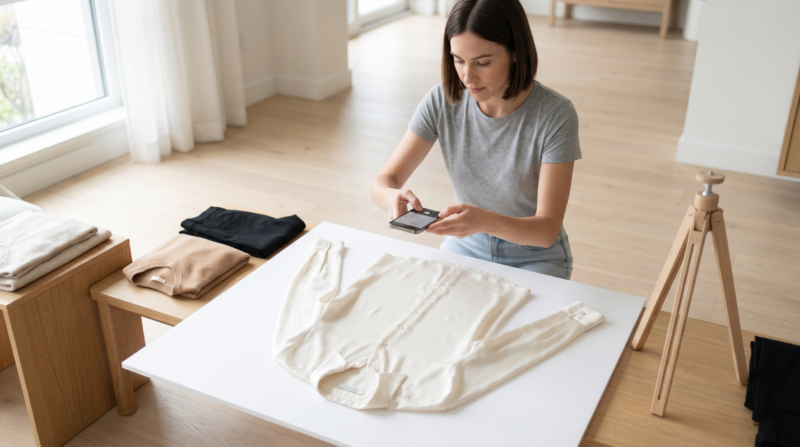
Digitizing Your Minimalist Wardrobe: How to Prep for AI Closet Apps

Implementing a digital closet organizer is one of the most transformative, stress-relieving steps you can take for your daily routine in 2026. If you have spent the last few months carefully curating a beautiful, smart-casual capsule collection, but still find yourself staring blankly at your hangers every morning, the problem isn’t your clothes—it is your data management. We live in a world where everything is optimized, yet we still rely on our tired morning brains to remember every single item we own and magically formulate stylish outfit combinations on the spot. It is an exhausting way to start the day.
Enter the era of AI closet apps. These brilliant pieces of software allow you to carry your entire wardrobe in your pocket. They analyze weather patterns, track your cost-per-wear, and use advanced artificial intelligence to suggest stunning, unexpected outfit pairings from the pieces you already own. But here is the catch: artificial intelligence is only as smart as the data you feed it. You cannot simply point your phone at a messy, tangled closet and expect the app to build you a flawless professional outfit.
Creating a highly functional, aesthetic virtual wardrobe requires a meticulous physical preparation phase. You are essentially building a clean, visual database of your personal style. In this comprehensive, 2000+ word guide, we are going to walk through the exact step-by-step process of digitizing your minimalist wardrobe. From the initial physical prep to lighting masterclasses and data tagging, we will ensure your transition to a digital closet is seamless, beautiful, and incredibly effective. Grab your phone, and let’s get started!
Table of Contents
- Why a Digital Closet Organizer is the Future of Smart-Casual Style
- The Prep Phase: Decluttering Before You Digitize Your Minimalist Wardrobe
- Creating the Perfect Lighting Setup for Your Digital Closet Organizer Photos
- Photographing Accessories: Capturing Yellow Gold and Radiant-Cut Diamonds
- Step-by-Step: Uploading to AI Closet Apps Like a Pro
- Mastering Metadata: Tagging Your Digital Closet Organizer
- Level Up Your Wardrobe: Essential Guides
- Conclusion & Next Steps
Why a Digital Closet Organizer is the Future of Smart-Casual Style
Before we dive into the technical “how-to,” let’s talk about why you are doing this. A beautifully curated minimalist wardrobe relies on the principle of mixing and matching a small number of versatile items. However, human memory is flawed. We tend to gravitate toward the same three “safe” outfits week after week, ignoring the hidden potential sitting right on our velvet hangers.
A digital closet organizer eliminates this “wardrobe blindness.” By having a visual catalog on your phone, you can plan your outfits during your evening commute, while waiting in line for coffee, or while lying in bed. It completely detaches the act of planning an outfit from the act of physically standing in your closet. According to a fascinating deep-dive by Vogue Business on virtual wardrobe technology, users who digitize their closets increase the utilization of their clothing by up to 40%, drastically reducing the impulse to buy fast fashion.
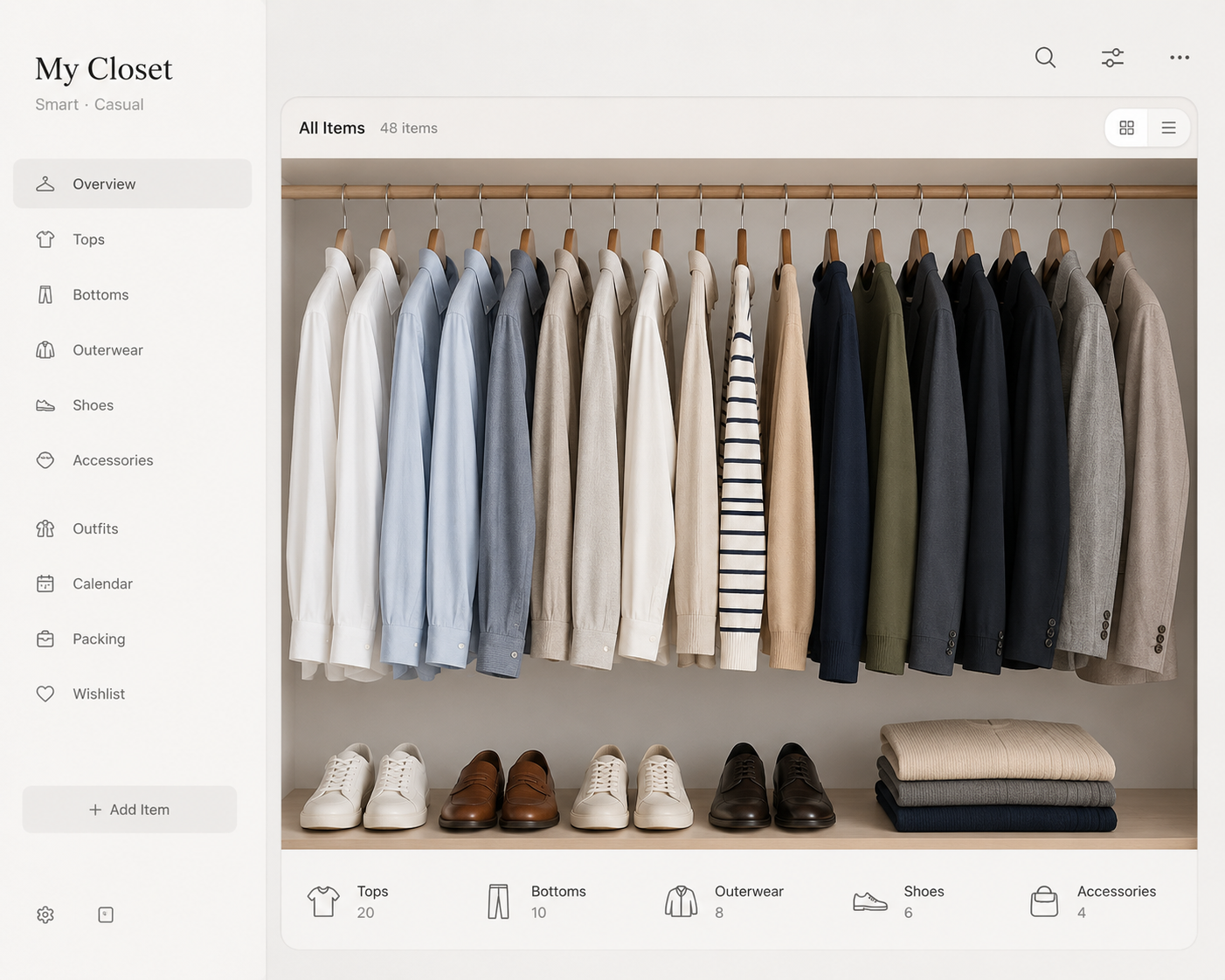
The Prep Phase: Decluttering Before You Digitize Your Minimalist Wardrobe
The golden rule of digitizing is simple: Do not digitize garbage. If you upload clothes that don’t fit, have permanent stains, or belong to a fantasy lifestyle you don’t actually live, you are just transferring your physical clutter into digital clutter. Your AI closet app will start suggesting outfits featuring a scratchy sweater you hate, which ruins the entire algorithm.
The Pre-Digitization Checklist
- The Ruthless Purge: Before snapping a single photo, ensure every item in your closet passes the fit and comfort test. We want a streamlined, highly functional collection of smart-casual pieces.
- The Steaming Session: AI background removers struggle with heavy wrinkles and shadows. Your clothes need to look their absolute best. Invest a Sunday afternoon into thoroughly steaming your silk blouses, pressing your trousers, and lint-rolling your dark blazers.
- The Categorization: Group your clothes by category (all bottoms, all tops, all outerwear) *before* you start photographing. This will make the uploading process infinitely faster.
Creating the Perfect Lighting Setup for Your Digital Closet Organizer Photos
This is where most people fail when building their digital closet organizer. They take a blurry, badly lit photo of a shirt hanging on a doorknob, upload it, and wonder why the app’s background eraser makes the shirt look like a jagged mess. The artificial intelligence in these apps relies on high-contrast edges to separate the garment from the background.
To get professional, seamless digital cut-outs, you need a controlled environment. You do not need an expensive DSLR camera—your modern smartphone is more than capable—but you do need good lighting and a solid background.
The Flat Lay vs. The Hanger Method
You have two choices for photographing your clothes: flat lays or hanger shots.
Flat Lays (laying the clothes flat on the floor) are excellent for trousers, jeans, and heavy knitwear. You will need a large piece of solid white poster board or a clean, wrinkle-free white sheet to lay on the ground.
Hanger Shots are better for blazers, dresses, and flowy blouses that need gravity to show their shape. For this, hang a simple removable hook on a blank, well-lit white wall. Use an invisible acrylic hanger or a very slim wire hanger so the app can easily erase it.
Mastering the Lighting
Natural, diffused daylight is your best friend. Set up your photography station near a large window, but avoid direct, harsh beams of sunlight, which will blow out the colors of your garments and create aggressive shadows. If you are doing this project in the evening or live in a low-light apartment, investing in a basic, inexpensive ring light will save you hours of frustration.
Photographing Accessories: Capturing Yellow Gold and Radiant-Cut Diamonds
When digitizing your minimalist wardrobe, do not forget your accessories! A smart-casual look is often defined by the jewelry that finishes it. However, photographing fine jewelry for AI apps requires a slightly different approach than a cotton t-shirt.
Metals and gems are highly reflective. If you take a photo of a stunning radiant-cut diamond pendant with your flash on, the AI will just see a blinding burst of white light and won’t be able to crop it. Similarly, capturing the true, warm luster of a yellow gold watch or bracelet requires soft, indirect light to avoid harsh glare.
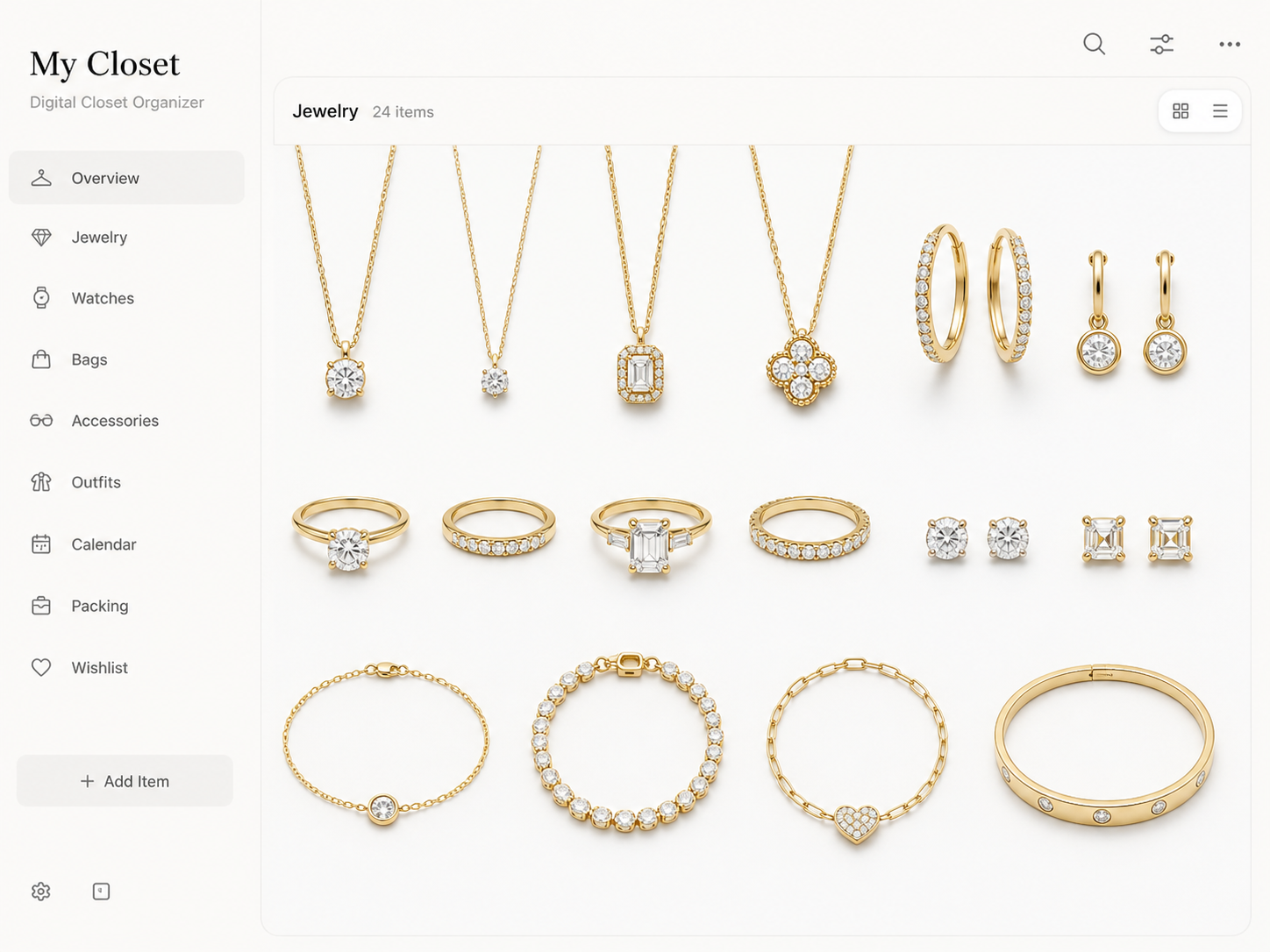
To digitize these investments perfectly, place them on a matte, non-reflective white surface (like heavy cardstock). Turn off your camera’s flash. Move your light source so it hits the jewelry from a slight side angle rather than straight on. This highlights the architectural facets of the radiant-cut diamond and shows off the rich color of the yellow gold without blowing out the image’s exposure. Clean, crisp images of your jewelry allow your digital closet organizer to suggest the perfect accessories for your daily outfits.
Step-by-Step: Uploading to AI Closet Apps Like a Pro
Once you have an album full of pristine, beautifully lit photos of your wardrobe, it is time to feed the machine. Whether you are using popular apps like Indyx, Whering, or Acloset, the upload process is generally similar. Here is how to batch-process your wardrobe efficiently:
- Batch by Category: Do not bounce back and forth between shoes and shirts. Upload all your blazers at once. This keeps your mind focused and speeds up the data entry process.
- Use the AI Background Eraser: Upload your photo and let the app remove the background. Because you took the photos against a solid white backdrop with good lighting, the AI should do this perfectly in seconds.
- Manual Refinements: Occasionally, the AI might accidentally erase a white collar against a white background. Use the manual “restore” or “erase” brush tools in the app to clean up the edges. A clean edge is crucial for making your digital outfits look realistic when collaged together!
Mastering Metadata: Tagging Your Digital Closet Organizer
This is the most critical step in the entire process. The AI in your digital closet organizer does not just look at the picture; it relies heavily on the metadata (the tags and categories) you apply to each item. If you skip this step, the app will not know how to generate appropriate outfits.
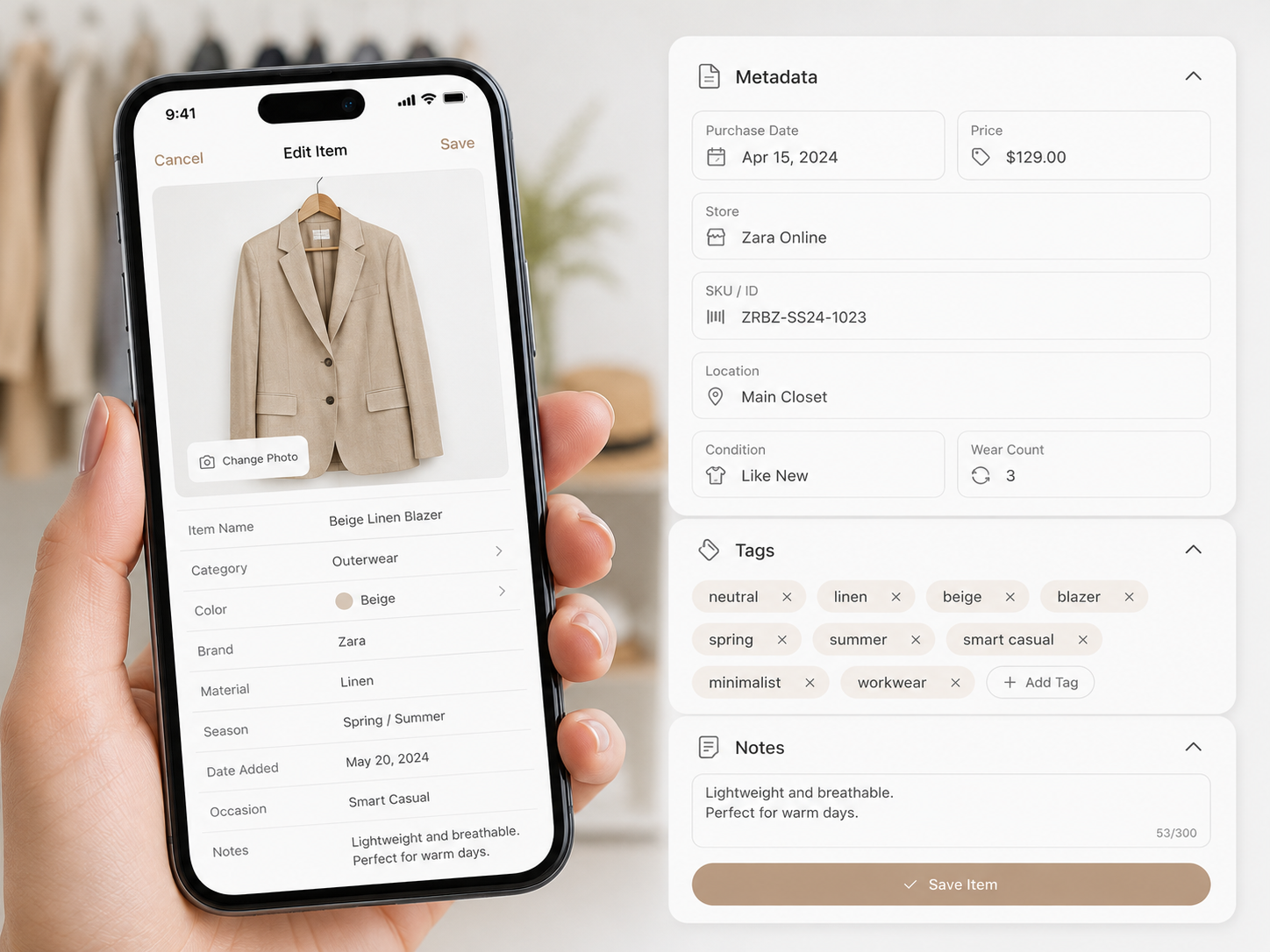
Treat this step like you are building a highly organized, functional database. The more accurate the data you input, the smarter the AI’s output will be. When you upload an item, make sure to fill out the following fields meticulously:
Essential Metadata Tags
- Primary Category & Sub-Category: Don’t just tag it “Top.” Tag it “Top > Button-Down > Long Sleeve.”
- Color Palette: Select the primary and secondary colors. This helps the AI build cohesive color-blocked outfits based on minimalist aesthetics.
- Seasonality: Tag items for Spring/Summer, Fall/Winter, or All-Season. You do not want the app suggesting a heavy wool coat in July!
- Occasion/Vibe: This is crucial for a smart-casual wardrobe. Tag items as “Office,” “Weekend,” “Formal,” or “Lounge.” When you tell the app you are going to a business meeting, it will filter out your weekend denim.
- Brand & Price (Optional but Recommended): Entering the purchase price allows these apps to calculate your “Cost Per Wear.” This is a fantastic metric that visually proves the value of investing in high-quality, long-lasting basics over cheap fast fashion.
Level Up Your Wardrobe: Essential Guides
Digitizing your closet is just the beginning of your style journey. Now that you have a high-tech system in place, you need to ensure the clothes inside it are actually working for your lifestyle. Continue refining your smart-casual aesthetic with these recent deep-dives from the Outfit Anatomy archives:
Conclusion & Next Steps
Setting up a digital closet organizer is undoubtedly a weekend project that requires patience, a good steamer, and a bit of data entry. However, the return on investment is absolutely staggering. By bridging the gap between your physical garments and digital AI styling tools, you are effectively hiring a personal stylist who lives in your pocket and knows your exact inventory.
Once your minimalist wardrobe is fully digitized, getting dressed transforms from a frantic morning chore into a calm, creative, and highly efficient process. You will start wearing pieces you haven’t touched in months, you will unlock completely new smart-casual combinations, and you will shop much more intentionally in the future. So, clear off some floor space, grab that white background, and start digitizing your way to flawless daily style!
Build a Smarter, More Efficient Wardrobe.
If you are serious about upgrading your style, optimizing your morning routine, and building a closet that commands respect, join the Outfit Anatomy community! Subscribe to our newsletter for weekly smart-casual styling formulas, digital organization hacks, and exclusive capsule wardrobe blueprints.
Subscribe to the Newsletter
2 Comments
The emphasis on data management being the bottleneck for AI closet apps is a crucial insight that often gets overlooked when people jump straight into buying new organization tools. It completely validates the feeling of having a perfect capsule wardrobe but still feeling stuck in the morning because the mental load of remembering every combination is too high.
My Closet Krush personal style assistant is amazing. Also Check out their app on Apple and Android